# The DOM
The DOM stands for "Document Object Model"
- tree-like structure that is a representation of the HTML document, the relationship between elements
- contains the content and properties of the elements.
- Think of the DOM as the link between an HTML web page and scripting languages.
- DOM Introduction (opens new window)
- Section 8.2 Parsing HTML documents (opens new window) from the W3C's HTML Documentation
- DOM Specification (opens new window) on W3C
- HTML Document Object Model mentioned in the ECMAScript Specification (opens new window) - the language specification used by JavaScript
# Example:
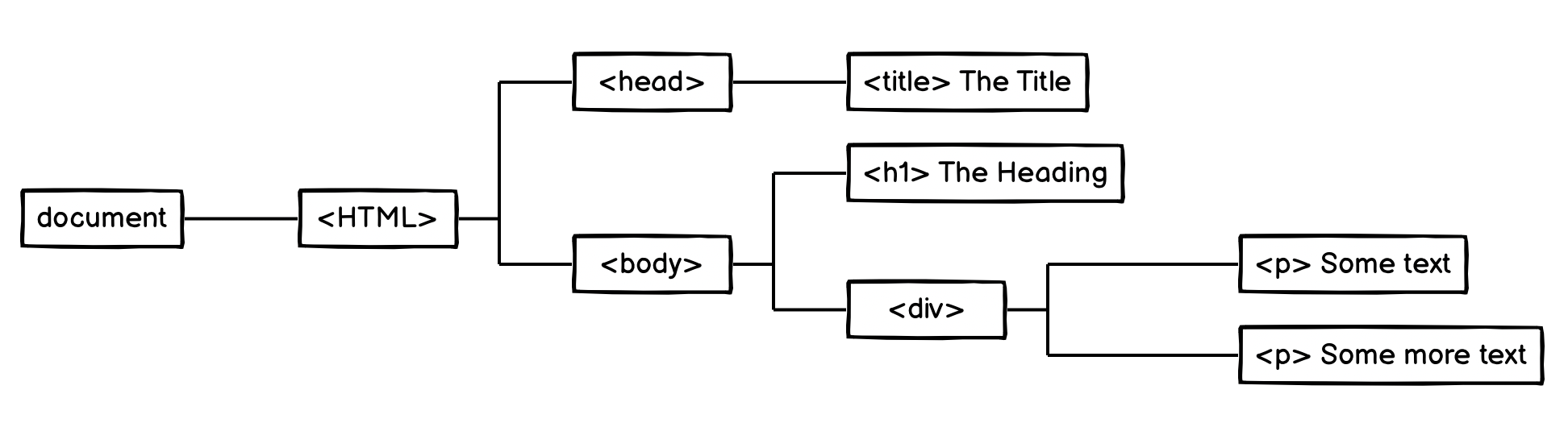
<html>
	<head>
		<title>The Title</title>
  </head>

  <body>
  	<h1>The heading</h1>
  	<div>
  		<p>Some text</p>
  		<p>Some more text</P>
  	</div>
  </body>
</html>
- a node is the equivalent of each family member in a family tree.
- the top-most node is called the root node, and it represents the HTML document.
- A parent node is the closest connected node to another node in the direction towards the root.
- A child node is the closest connected node to another node in the direction away from the root.
There are nine different types of node objects in the DOM tree, eg Element (opens new window), Text (opens new window), etc.
# The document keyword
The
documentobject is provided by the browser and is a representation of the HTML document. This is not provided by the JavaScript language.The
documentkeyword gives access to the root of the DOM in JavaScript
https://developer.mozilla.org/en-US/docs/Web/API/Document
# The window Keyword
Global top-element -> the active Browser Window/Tab
Acts as global storage for script. Also provides access to window-specific properties and methods. E.g.:
- you have direct access to
alert()correct would be:windows.alert()
the browser always adds
windows.in front of a function if that funct can't be found anywhere else- you have direct access to
also contains the Document-object, events, methods, outerHeight, outerWidth, etc
# Nodes and NodeList
Every element in the DOM is a node. This is represented by a Node object.
A NodeList object is a list or collection of nodes extracted from a document .It is an array-like collection of objects (but is not an array)
has a length property and an index(0, 1, 2, 3, ...) to access each item,
You can loop over a NodeList with either its
.forEach()method, or aforloop (alsofor...of)You cannot use Array methods, like
map(),filter(),reduce(),push(),pop(), orjoin()If you want to use an array method, transform it into an array first:
const divs = document.querySelectorAll('div')
divs.forEach(div => {
	/* ... */
}) // this works

divs.map(div => { /* ... */ }) // throws error

// turn NodeList into array first:
[...divs].map(div => { /* ... */ })
# Node Types
https://developer.mozilla.org/en-US/docs/Web/API/Node/nodeType (opens new window)
There are 12 node types. In practice we usually work with 4 of them:
document - the whole document is formally a DOM node as well
element nodes - ("Elements") HTML-tags, the tree building blocks -> most important
text nodes - represents text content in an element or attribute
(whitespace in the HTML-file is also added as text-nodes but not rendered to screen)
attribute nodes - atteribute of an element
comments - won’t be shown, but JS can still read it
DOM Nores are JavaScript objects
# Elements
- have specials properties and methods (depending on the kind of element)
- can be selected vie JavaScript
- can be created and removed via JavaScript